Honeycomb Aeronautical Echo Aviation Controller Review
Flight simulation has always been a bit of a commitment. If you want the “real” experience, you’re usually signing up for a desk full of hardware, a lot of cables, and a setup that never really goes away. If you don’t, you’re stuck wrestling with a standard controller that was never designed to fly anything more complicated than a camera drone. The Honeycomb Aeronautical Echo Aviation Controller exists right in the middle of those two worlds—and it might be the most convincing middle‑ground solution flight sims have seen in years.
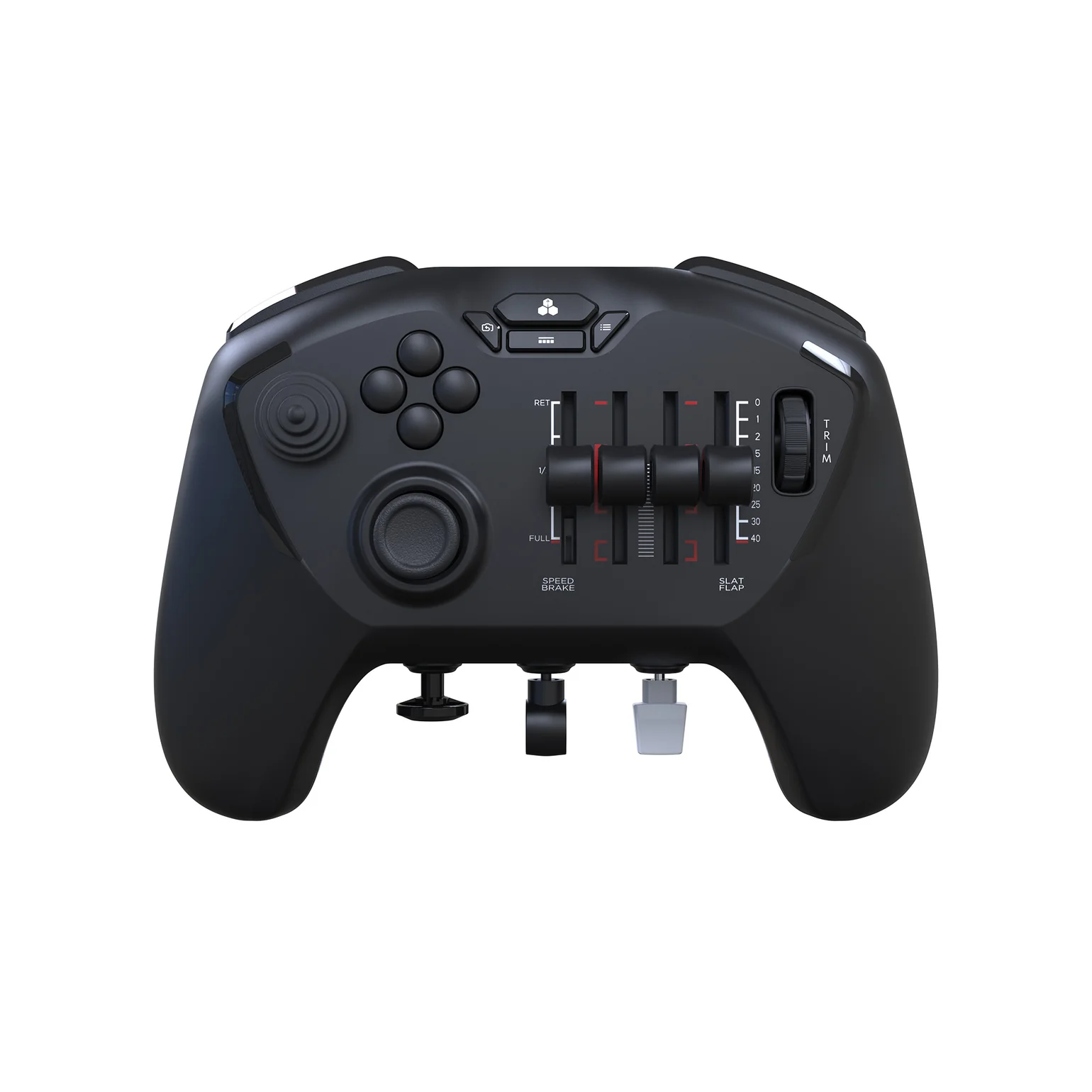
This isn’t just a regular gamepad with extra buttons slapped on. The Echo feels like Honeycomb sat down and asked a very specific question: What if we could shrink an entire flight setup into something you could use on the couch? Against all odds, they actually pulled it off.
The first time you see the Echo, it’s a little jarring. It looks familiar enough to recognize as a controller, but the layout is clearly doing something different. Sliders where a thumbstick should be. Switches where you expect face buttons. Levers, paddles, and dials everywhere. It’s busy—but intentionally so.
Once you pick it up, it immediately feels like a premium piece of hardware. The plastic doesn’t creak, the switches don’t wobble, and every control has a reassuring resistance to it. Honeycomb even includes a hard‑shell carrying case, which sounds like a throw‑in until you realize this is absolutely the kind of controller you’ll want to protect if you’re tossing it into a backpack.
Everything about the Echo gives off the sense that it was designed by people who actually use flight sim gear, not just people trying to make something look flight‑sim‑adjacent.
Let’s get this out of the way: the Echo can feel overwhelming at first. There’s no gentle on‑ramp here. The first time you boot into Microsoft Flight Simulator and rest your thumbs on the controller, your brain needs a moment to catch up.

But once it does, the layout starts to click.
Pitch and roll are handled by a Hall‑effect thumbstick, and it feels fantastic. Movements are smooth, precise, and predictable, which is exactly what you want when you’re trimming an approach or correcting a crosswind landing. It never feels twitchy or floaty in the way standard controllers often do.
Yaw control is where the Echo really separates itself. Instead of relying on triggers or button modifiers, Honeycomb uses paddles on the underside of the controller that move in opposition, mimicking real rudder pedals. It’s surprisingly intuitive. After a few flights, using anything else feels clumsy by comparison.
Then there are the four analog sliders sitting where a right thumbstick would normally be. These can be mapped to throttle, mixture, prop pitch, flaps, or speed brakes, and they come with interchangeable caps depending on whether you’re flying general aviation aircraft or airliners. The detents—especially when pulling into idle or reverse thrust—add a tactile feedback loop that makes flying feel more physical and deliberate.
Dedicated switches for landing gear and flaps, a proper trim wheel, and clearly labeled buttons round out the setup. You spend far less time diving into menus, which is a huge win for immersion.

In actual flight, the Echo is a joy to use. Microsoft Flight Simulator feels immediately more manageable and more “alive” compared to playing with a standard controller. Small corrections are easier. Holding a steady climb or descent takes less effort. Helicopters, in particular, benefit enormously from the precise yaw control and smooth analog inputs.
General aviation aircraft feel like the Echo’s natural habitat. Adjusting mixture, trimming for cruise, and managing power becomes second nature once muscle memory sets in. Airliners are also very playable thanks to the quad sliders and physical switches, even if hardcore sim pilots will still prefer full‑size hardware for long-haul sessions.
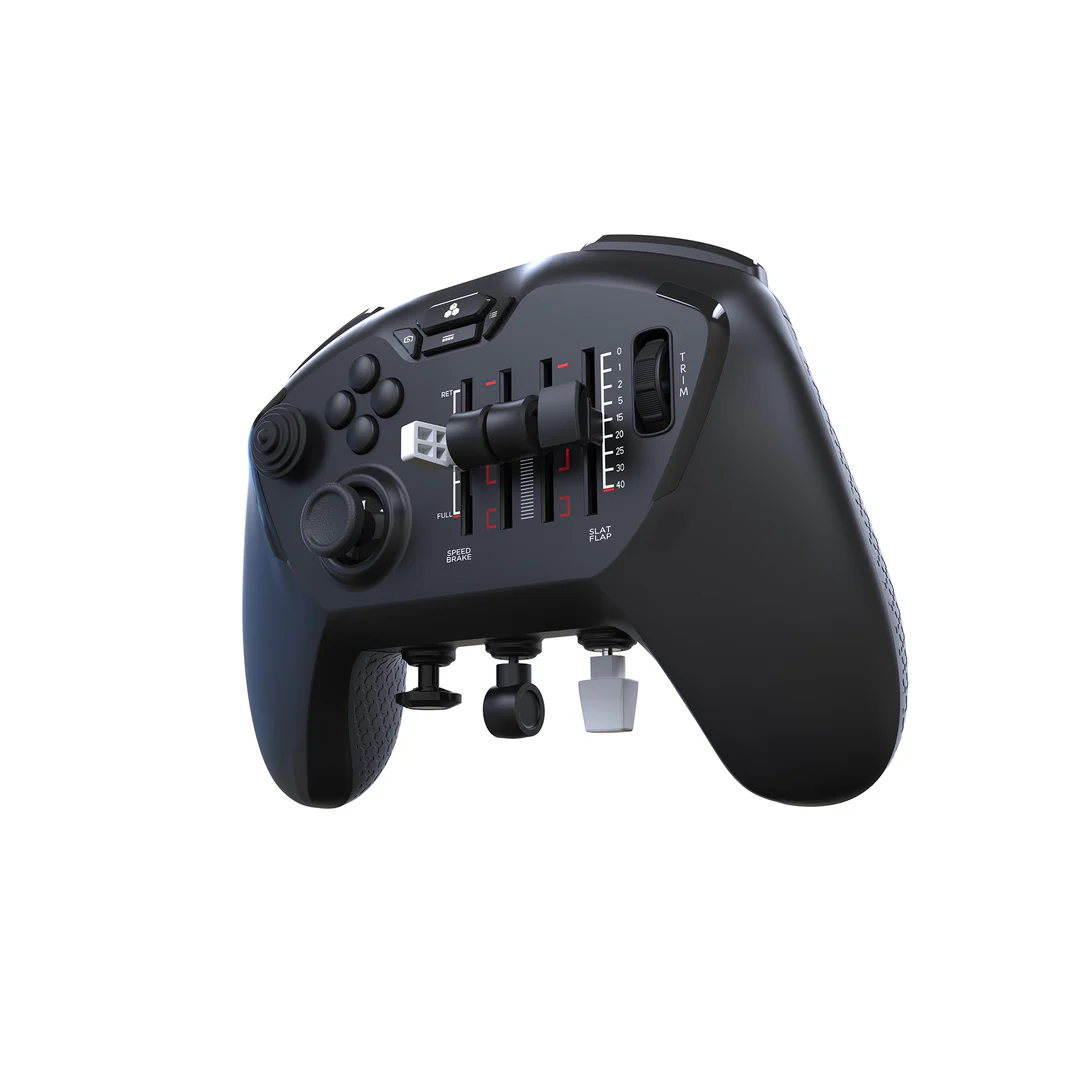
There are a few awkward moments. The placement of certain buttons—like the hat switch for camera control—can feel a bit off, and it takes time to fully internalize where everything is. But once you get past that learning curve, the Echo stops feeling strange and starts feeling smart.
The Echo connects wirelessly via a USB dongle and also works wired over USB‑C. Battery life is solid, easily lasting through long sessions without anxiety, and charging is painless.
The biggest drawback is compatibility. Right now, the Echo is PC‑only. If you’re flying on Xbox, you’re out of luck—for now. Given how natural this controller feels for couch play, console support would make it an instant recommendation for an even wider audience. As it stands, that missing support is the Echo’s most noticeable limitation.
The Honeycomb Aeronautical Echo Aviation Controller is one of those rare pieces of hardware that feels genuinely new. It doesn’t try to replace a full flight rig, and it doesn’t pretend to be a casual controller either. Instead, it confidently occupies its own space—and does so extremely well.
If you’re short on space, travel often, or just want a more immersive way to fly without committing to a full cockpit setup, the Echo is easy to recommend. It’s thoughtful, well‑built, and deeply satisfying to use once you get comfortable with it.
For flight sim fans who want something better than a standard controller but less overwhelming than a desk full of gear, the Echo might just be the sweet spot.
Article By Kevin Austin